Nvidia’s Blackwell lineup spans everything from budget 1080p gaming to demanding 4K rendering and AI workloads. The differences in performance, memory and power consumption are substantial, but higher prices do not always buy proportionately better results.
Buying a graphics card used to be a relatively straightforward exercise: establish a budget, compare frame rates and choose the fastest model you could afford. Nvidia’s RTX 50 series makes that calculation more complicated.
The RTX 5060 Ti, for instance, offers 16GB of VRAM, four gigabytes more than the RTX 5070. Yet the latter is roughly 31% faster at 1440p Ultra settings. Further up the range, the RTX 5080 and RTX 5070 Ti both carry 16GB of memory, despite differences in processing power and price.
Then there is the RTX 5090. With twice the memory and more than double the CUDA cores of the RTX 5080, it looks vastly more powerful on paper. Gaming benchmarks tell a more restrained story, particularly at lower resolutions.
Nvidia’s Blackwell architecture brings improved ray tracing, AI acceleration and GDDR7 memory to much of the range, but hardware specifications alone do not tell buyers which card makes sense for their needs.
Benchmark results from Tom’s Hardware show where the biggest performance gains occur, how memory limitations affect real-world workloads and which upgrades offer relatively little improvement.
Nvidia RTX 50 Series Specifications and Gaming Performance
| Graphics Card | CUDA Cores | VRAM | Power (TGP) | 1440p Ultra | 4K Ultra |
|---|---|---|---|---|---|
| RTX 5050 | 2,560 | 8GB | 130W | 45 FPS | 17 FPS |
| RTX 5060 | 3,840 | 8GB | 145W | 60 FPS | 22 FPS |
| RTX 5060 Ti 8GB | 4,608 | 8GB | 180W | 69 FPS | 28 FPS |
| RTX 5060 Ti 16GB | 4,608 | 16GB | 180W | 73 FPS | 40 FPS |
| RTX 5070 | 6,144 | 12GB | 250W | 96 FPS | 54 FPS |
| RTX 5070 Ti | 8,960 | 16GB | 300W | 117 FPS | 69 FPS |
| RTX 5080 | 10,752 | 16GB | 360W | 128 FPS | 77 FPS |
| RTX 5090 | 21,760 | 32GB | 575W | 167 FPS | 111 FPS |
Frame rates are rounded averages from Tom’s Hardware’s native-resolution rasterization benchmarks at Ultra settings, without DLSS upscaling or frame generation. Performance varies by game and test configuration. TGP figures reflect Nvidia’s rated GPU power consumption rather than total system power.
The most striking feature of the lineup is how unevenly performance scales. Some upgrades produce gains of 30% or more, while others deliver barely 10%.
VRAM capacity is equally inconsistent. The RTX 5070 has less memory than the cheaper RTX 5060 Ti 16GB, and the RTX 5080 offers no memory increase over the RTX 5070 Ti.
For gamers, those differences affect performance at demanding settings. For creators, they can determine whether a project fits into GPU memory at all.
RTX 5050 vs. RTX 5060: A Clear Difference in 1080p Gaming
The RTX 5050 and RTX 5060 occupy the entry-level end of Nvidia’s Blackwell lineup. Both have 8GB of VRAM, although their similarities largely end there.
The RTX 5050 uses 2,560 CUDA cores and GDDR6 memory, delivering 320GB/s of bandwidth. The RTX 5060 raises the core count to 3,840 and adopts GDDR7 memory, increasing bandwidth to 448GB/s.
At 1080p Ultra settings, the RTX 5050 averages approximately 69 FPS. The RTX 5060 reaches around 89 FPS, a 28% improvement.
At 1440p Ultra, the RTX 5060 maintains a substantial lead, averaging about 60 FPS against 45 FPS for the RTX 5050.
Those differences are large enough to be noticeable during gameplay, particularly in demanding titles where frame rates fall below a monitor’s refresh rate.
Neither card is designed for consistently smooth native 4K gaming at maximum settings. Their 8GB memory capacity also limits their appeal for demanding content creation, large textures and certain AI applications.
The RTX 5050 still has a place in budget systems, especially for lighter games or users prepared to lower graphical settings. But when the price difference is manageable, the RTX 5060 offers considerably more gaming performance.
RTX 5060 Ti 8GB vs. 16GB: Identical GPUs, Very Different Results
The two RTX 5060 Ti variants share the same underlying GPU, with 4,608 CUDA cores, a 128-bit memory interface and 448GB/s of bandwidth.
Only the VRAM capacity changes: 8GB on the less expensive version and 16GB on the higher-memory model.
In games that fit within 8GB, their performance can be similar. Problems arise when texture data, ray-tracing assets or other resources exceed the available memory.
A broader 21-game comparison by Tom’s Hardware, covering rasterization and ray-tracing workloads, found that the 8GB model was approximately 11% slower at 1080p Ultra, 18% slower at 1440p Ultra and 42% slower at 4K Ultra.
The unusually large 4K gap reflects memory-intensive titles in the combined test suite. It should not be interpreted as a universal 42% difference in every game.
When VRAM fills up, the graphics card may need to rely more heavily on system memory. That introduces additional latency and can reduce frame rates, cause stuttering or require lower texture settings.
Creative workloads expose similar limitations.
Many professional applications show only minor differences between the two cards, typically around 1–5% when memory capacity is sufficient. AI image generation can behave very differently. In a Stable Diffusion XL workload tested by Tom’s Hardware, the 8GB version suffered a severe performance penalty.
The 16GB card will not automatically render every scene or process every video faster. Its advantage is the ability to accommodate larger datasets without running into the same memory constraints.
The 8GB model remains viable for lighter 1080p gaming. Anyone planning to use high-resolution textures, demanding ray tracing, complex 3D scenes or local AI tools has stronger reasons to consider the 16GB version.
RTX 5060 Ti 16GB vs. RTX 5070: Is More Memory Better Than More Speed?
The RTX 5070 presents an unusual choice. It is the faster graphics card, despite having less VRAM than the RTX 5060 Ti 16GB.
Its 6,144 CUDA cores represent a 33% increase over the RTX 5060 Ti’s 4,608. Memory bandwidth jumps from 448GB/s to 672GB/s, although capacity falls from 16GB to 12GB.
The performance advantage is substantial.
At 1440p Ultra, the RTX 5070 averages approximately 96 FPS, compared with 73 FPS for the RTX 5060 Ti 16GB.
At 4K Ultra, the RTX 5070 delivers around 54 FPS against 40 FPS.
These results put the RTX 5070 ahead by roughly 31% at 1440p and 35% at 4K in the tested rasterization workloads.
For gaming, that additional processing power is generally more useful than four extra gigabytes of memory, assuming the game runs comfortably within 12GB.
The situation changes with large creative projects.
A complex Blender scene, high-resolution texture library or AI workload requiring more than 12GB of VRAM may run more effectively on the RTX 5060 Ti 16GB, even though its processor is slower.
Memory-intensive applications can experience dramatic slowdowns when their working data no longer fits on the GPU. Some models or rendering projects may require changes to their configuration simply to run within a smaller memory limit.
If both cards have sufficient VRAM, however, the RTX 5070’s greater computing power becomes the more valuable asset.
The RTX 5070 is the stronger gaming card. The RTX 5060 Ti 16GB remains relevant for buyers whose applications require more memory than the RTX 5070 provides.
RTX 5070 vs. RTX 5070 Ti: More Speed and More VRAM
The RTX 5070 Ti addresses two limitations of the standard RTX 5070: processing power and memory capacity.
It carries 8,960 CUDA cores compared with the RTX 5070’s 6,144, an increase of approximately 46%. VRAM expands from 12GB to 16GB, while bandwidth rises from 672GB/s to 896GB/s.
Gaming performance improves by a smaller but still meaningful margin.
The RTX 5070 Ti averages approximately 117 FPS at 1440p Ultra, compared with 96 FPS for the RTX 5070. At 4K Ultra, the figures are about 69 FPS and 54 FPS, respectively.
That puts the Ti model roughly 21% ahead at 1440p and 26% ahead at 4K.
The combination of higher frame rates and 16GB VRAM makes it better suited to demanding 1440p gaming and more capable at native 4K settings.
The extra memory also gives developers, designers and video editors additional room for complex projects.
Video encoding hardware differs between the cards. The RTX 5070 has one ninth-generation NVENC encoder, while the RTX 5070 Ti includes two. Applications capable of distributing supported encoding work across multiple engines can benefit, particularly in multi-stream workflows.
Power consumption rises from 250W to 300W.
For buyers choosing between these two models, the RTX 5070 Ti offers a broad upgrade rather than an improvement in only one specification. Whether that upgrade is worthwhile depends largely on how much more it costs.
RTX 5070 Ti vs. RTX 5080: Paying More for Smaller Gains
The RTX 5080 is faster than the RTX 5070 Ti, but the difference is considerably smaller than the jump between several lower-tier models.
Both cards have 16GB of GDDR7 memory.
The RTX 5080 increases CUDA cores from 8,960 to 10,752, a 20% rise. Memory bandwidth improves more modestly, from 896GB/s to 960GB/s.
At 1440p Ultra, benchmark averages move from 117 FPS on the RTX 5070 Ti to 128 FPS on the RTX 5080.
At 4K Ultra, performance rises from approximately 69 FPS to 77 FPS.
Those gains amount to roughly 10% at 1440p and 13% at 4K.
The RTX 5080 also has two sixth-generation NVDEC decoders, compared with one on the RTX 5070 Ti. Certain video workflows may benefit from the additional decoding hardware, depending on application support and codec requirements.
Its rated power consumption reaches 360W, against 300W for the RTX 5070 Ti.
With the same 16GB VRAM capacity, the RTX 5080 does not offer a solution to memory limits that the RTX 5070 Ti might encounter. Buyers are paying primarily for additional processing speed.
That can be worthwhile for demanding 4K gaming or specialized workflows where shorter rendering times matter. But a substantial price premium is harder to justify when the gaming improvement is typically around 10–13% in the tested scenarios.
The RTX 5070 Ti deserves particular attention from buyers seeking high-end performance without paying for the relatively small final gains available from the RTX 5080.
RTX 5080 vs. RTX 5090: Twice the Hardware Does Not Mean Twice the FPS
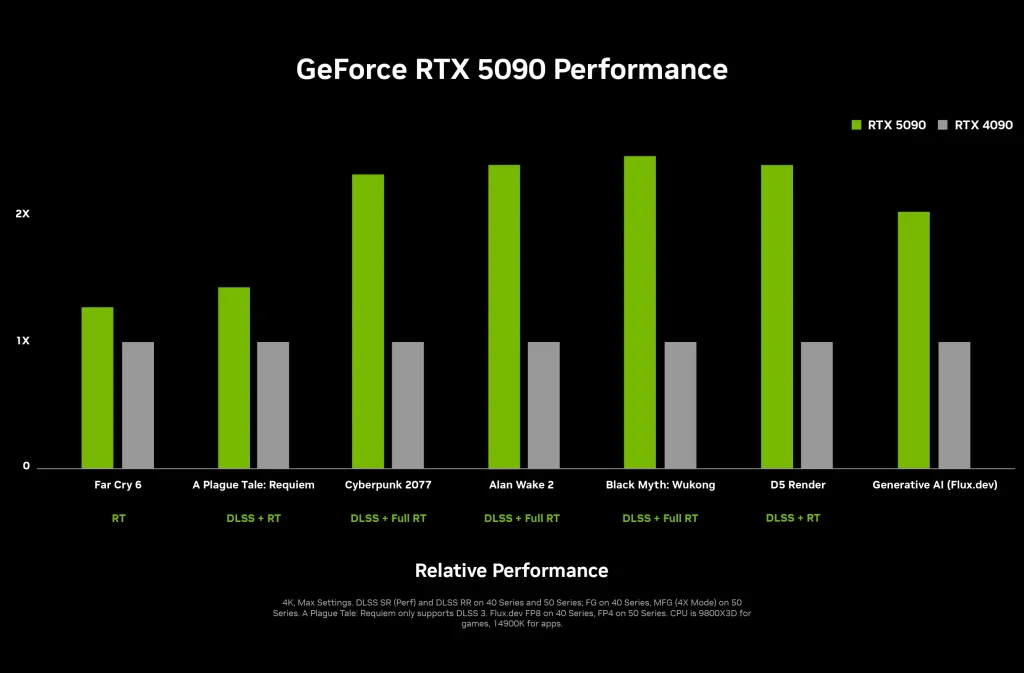
The RTX 5090 stands apart from the rest of Nvidia’s RTX 50 series.
It features 21,760 CUDA cores, more than twice the RTX 5080’s 10,752. VRAM doubles from 16GB to 32GB, while bandwidth climbs from 960GB/s to 1,792GB/s.
The gap in real-world gaming performance is substantial, particularly at 4K.
At 1440p Ultra, the RTX 5090 averages around 167 FPS versus 128 FPS for the RTX 5080, an improvement of approximately 30%.
At 4K Ultra, the RTX 5090 reaches roughly 111 FPS, compared with 77 FPS for the RTX 5080. That is an increase of approximately 43%.
Ray tracing places greater demands on the hardware. In 4K Ultra ray-tracing benchmarks, the RTX 5090 averages around 64 FPS against 42 FPS for the RTX 5080, a gain of approximately 52%.
The flagship’s much larger hardware configuration is clearly useful, but gaming performance does not scale linearly with CUDA core counts.
CPU limitations, game-engine behavior, memory access patterns and how efficiently software uses the GPU all influence the final result.
For professional users, the RTX 5090’s 32GB of VRAM may matter more than its gaming advantage.
Large 3D scenes, high-resolution rendering projects and local AI models can place enormous demands on GPU memory. Doubling the capacity allows workloads that may exceed the limits of 16GB cards.
The RTX 5090 also includes three ninth-generation NVENC encoders, compared with two on the RTX 5080, providing more hardware resources for supported encoding tasks.
Its power requirements are unusually high.
Nvidia rates the RTX 5090 at 575W Total Graphics Power, compared with 360W for the RTX 5080. Recommended system power supply capacity increases from 850W to 1,000W under Nvidia’s reference configuration.
A build using the RTX 5090 needs careful attention to cooling, airflow, connector compatibility and available power.
For enthusiasts seeking maximum native 4K performance, or professionals who genuinely need 32GB of GPU memory, the RTX 5090 occupies a category of its own.
Most gaming workloads, however, will not fully exploit everything it offers.
How Much VRAM Do You Need for Gaming and Content Creation?
VRAM is frequently treated as a simple indicator of graphics card quality. In practice, its importance depends on the workload.
A faster GPU with 12GB of memory can outperform a slower 16GB card when both have sufficient capacity. The relationship changes when a game or application needs more memory than the smaller card can provide.
For 1080p gaming, 8GB can remain adequate, particularly in less demanding titles or with reduced texture settings. Modern games using high-resolution assets and ray tracing may require more, even at 1080p.
At 1440p, 12GB provides greater flexibility, while 16GB offers additional headroom for demanding settings and future releases.
Native 4K gaming increases memory pressure further, although the required capacity varies significantly between titles.
Content creation is less predictable.
A video editing project using highly compressed footage may require relatively little VRAM, while another involving high-resolution effects, GPU processing and multiple streams can need much more.
A complex 3D rendering scene or AI model may also have memory requirements that exceed those of many games.
Before choosing a GPU, creators should check the memory requirements of the software and projects they actually use. A card with more VRAM can be the better tool even when it performs worse in gaming benchmarks.
Which RTX 50 Series GPU Is Best for Your Needs?
The answer depends less on model numbering than on resolution, workload and budget.
| Primary Use | GPU Worth Considering | Main Reason |
|---|---|---|
| Budget 1080p gaming | RTX 5060 | Strong performance improvement over RTX 5050 |
| Memory-sensitive workloads on a budget | RTX 5060 Ti 16GB | 16GB VRAM at a lower GPU tier |
| 1440p gaming | RTX 5070 | Substantially faster than RTX 5060 Ti |
| High-refresh 1440p and 4K gaming | RTX 5070 Ti | Strong performance with 16GB VRAM |
| Higher-end 4K gaming | RTX 5080 | Additional GPU speed, though with smaller gains |
| Maximum 4K performance and demanding AI/3D workloads | RTX 5090 | 32GB VRAM and the highest processing capability |
These are performance-based recommendations, not fixed value rankings. Retail pricing can change which model makes the most financial sense.
A discounted RTX 5080 might be attractive against an expensive RTX 5070 Ti, for example. Similarly, the RTX 5060 Ti 16GB becomes more compelling when its price approaches that of the 8GB version.
The same consideration applies to power consumption and system upgrades. A graphics card requiring a new PSU, larger case or additional cooling can cost more than its shelf price suggests.
The Bottom Line
Nvidia’s RTX 50 series offers substantial performance improvements as buyers move up the lineup, but the gains are far from consistent.
The RTX 5060 is a meaningful step above the RTX 5050 for 1080p gaming. The RTX 5060 Ti 16GB stands out for its memory capacity, while the RTX 5070 delivers more raw gaming performance despite having less VRAM.
The RTX 5070 Ti combines stronger processing hardware with 16GB memory, making it a versatile option for demanding games and creative applications. The RTX 5080 adds speed, but its relatively small improvement over the 5070 Ti makes pricing especially important.
At the top, the RTX 5090 offers capabilities no other model in the lineup can match, particularly its 32GB VRAM configuration. Those capabilities come with unusually high power requirements and a considerable financial commitment.
The most expensive GPU is not automatically the most sensible purchase. Gaming performance, available memory and total system cost all matter, and their relative importance changes with the software being used.
For anyone choosing between two RTX 50 series cards, understanding which of those three factors will actually limit performance is more useful than comparing model names alone.
Sources: GPU specifications, memory configurations, encoding hardware and power ratings are based on Nvidia's official GeForce specifications. Gaming performance figures are drawn from Tom's Hardware's GPU Benchmarks Hierarchy, with additional findings from its RTX 5060 Ti 8GB versus 16GB comparison. Figures represent benchmark results under the stated testing conditions and may differ across games, drivers and system configurations.

Farid Amber is a Canada-based writer and Editor-in-Chief who covers technology, space, and the environment. With a strong technical background, he brings a clear and practical perspective to stories about innovation, science, and the future of our planet.
His education includes a diploma in Applied Science, a master’s degree in Industrial Electrical Engineering, and a diploma in Electromechanical Automated Systems. This gives him a deep understanding of how modern technologies work, from complex engineering systems to the ideas driving new discoveries.
As Editor-in-Chief, Farid focuses on making complex topics easy to read, accurate, and meaningful. His goal is to help readers understand not only what is happening in the world of science and technology, but why it matters.
Leave a Reply